
xAI documents eight use cases for Grok Bot. Sales outbound. Talent scout. Paid media. Expense manager. Product performance. Bug reproduction. Account health. Chief of staff.
They are unusually specific for vendor examples, and every one of them is a function rather than a task. If you run paid media or sit in a sales org, you can see yourself in that list immediately. If you do not, the list quietly says this is for somebody else, and most of the demos circulating since the 11 August launch have made that worse rather than better.
So here is the other list. Seven things it does that sit inside an ordinary desk job, each one traced back to xAI's own documentation, plus the detail underneath all of them that took me longest to notice and matters more than any individual item.
Start with the output, because that is the actual difference
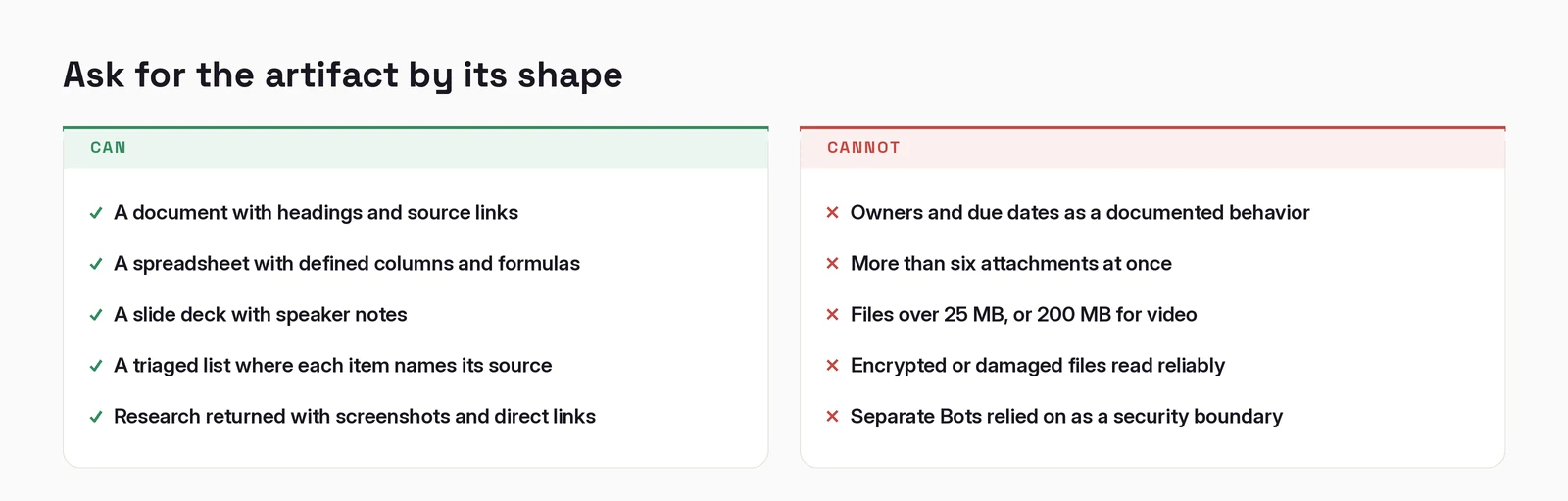
Buried in the documentation page on files and results is a short list of things you can ask a Bot to produce. Not features. Shapes of deliverable:
"A document with headings and source links"
"A spreadsheet with defined columns and formulas"
"A slide deck with speaker notes"
Read those again as specifications rather than marketing. A document with source links. A spreadsheet with formulas, not values. A deck with speaker notes.
That is the whole difference between this and a chat window, and it is not the model. A chat window gives you text you then rebuild somewhere else. This gives you the file, and the documentation's phrasing tells you the file is expected to arrive structured. The docs say results arrive as artifacts you act on directly: "Files, images, links, and tool results appear as cards in the conversation," and from there you "save the file, open the source link, or continue the conversation with feedback."
Which means the skill this rewards is not prompting. It is naming the artifact.
Almost everything below is a variation on that one move.

The seven
1. Clear the inbox. The chief-of-staff pattern in the docs is really an inbox pattern wearing a job title. Its example prompt asks the Bot to review activity across "my approved channels, inbox, calendar, and meeting notes" and to return, for each item, "the source, why it matters, the proposed next step, and whether I owe a decision."
The load-bearing word is source. You get a triaged list where every line still points back at the message it came from, so nothing has to be re-found. That is the difference between a summary and a working queue.
2. Build the slides. "A slide deck with speaker notes." Hand it an outline and a sense of the audience. Ask for the notes explicitly. They are what turns a deck you have to re-learn before presenting into one you can pick up.
3. Model the math. "A spreadsheet with defined columns and formulas." Formulas, not a table of computed numbers. When an assumption moves, the projection recalculates instead of being rebuilt. If you ask for a spreadsheet without saying the word formulas, there is a decent chance you get hardcoded values that look identical and are inert.
4. Write the draft. "A document with headings and source links." Memos, briefs, reports, user manuals. Not finished, but past the blank page, with its claims traceable. The expense-manager example is stricter still, asking for "policy citations on every exception and totals that reconcile back to the source." That is a good habit to steal for any document you will have to defend.
5. Run the meeting. Meeting notes are one of the connected sources in the chief-of-staff pattern, and the same return format applies: the next step and whether a decision is owed, each tied to where it came from. Worth being precise about what the docs do and do not promise here: they describe next steps and decisions owed. Owners and due dates are a reasonable thing to ask for on top, but that is your instruction, not a documented behavior.
6. The art chores. This one is not from the reference docs. It is from a guide xAI published about designing Grok Bot's own interface using Grok Bot, written by one of their designers, John Bai. The tasks described are populating twenty starter cards with differentiated portraits and attributes, finding and placing tool logos ordered by likely usage, and holding spacing, typography, fills and strokes consistent across components.
The line that made me include it:
"These tasks aren't creatively difficult, but they consume creative attention."
That is the most honest sentence I have read from any vendor about this category of tool. It does not claim to be creative. It claims to protect the attention creativity needs, which is a smaller and far more defensible promise. Resizes, variants, exports. The attention tax on creative work, rather than the work.
7. Stress-test ideas. The bug-reproduction and product-performance patterns both ask for evidence rather than conclusions: "return a short write-up with screenshots and direct links," and "Return exact steps, expected and actual behavior, screenshots." Point that at a plan instead of a bug. You get research you can check, which is the only kind worth having.
The sentence pattern that makes all seven work
Look at how xAI actually writes its example prompts. Here is the chief-of-staff one in full, because the structure is the lesson:
"Review activity since yesterday across my approved channels, inbox, calendar, and meeting notes. Return only items that map to the priorities in this document. For each item, include the source, why it matters, the proposed next step, and whether I owe a decision. Do not send messages or change meetings."
Four moves, in order:
- Scope the input. Named sources, and a time window.
- Filter it. Only what maps to a document you attached.
- Specify the artifact. Not "summarize", but a defined shape, per item, with source.
- State what it must not do. "Do not send messages or change meetings."
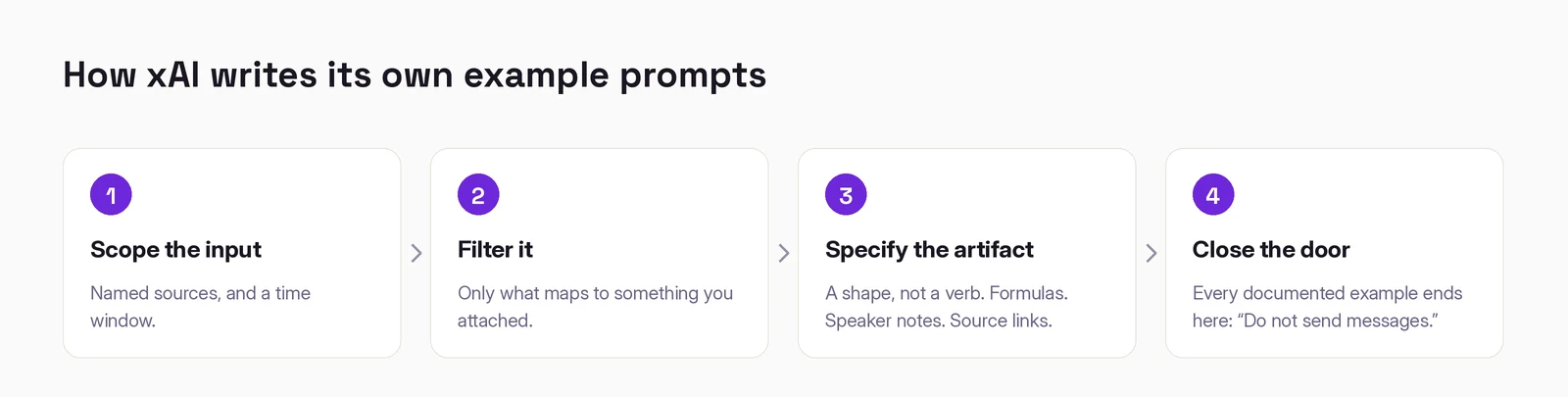
Every documented example ends on that fourth move. The expense one closes "Return the summary and drafts; do not send messages or change reimbursements." It is a house style, and it is the right one: describe the deliverable, then close the door behind it. An agent that can act needs to be told where acting stops, and the cheapest place to say so is in the same sentence that asks for the work.
Where it breaks
Four constraints worth knowing before you build a habit around any of this.
Attachments are capped. The desktop composer takes "up to six attachments at a time. Documents, images, and audio can be up to 25 MB each; videos can be up to 200 MB." Fine for a brief, awkward for a quarter of exports.
Some files simply will not open. "Large, encrypted, damaged, or unusual files may not be readable." If a workflow depends on a password-protected export, find that out now rather than on a deadline.
Iterate on the artifact, not around it. The docs are direct about this: "Ask the Bot to revise the existing artifact instead of making disconnected copies." The failure mode is ending up with five near-identical decks and no idea which one is current.
And the one that connects to everything else. The files land in a shared workspace. xAI's documentation says Bots keep durable project files in /workspace, and that "Bots can read files other Bots save." That is convenient by design and it is also the same architecture that makes a roster of specialized Bots a naming convention rather than a permission model. Every one of them shares a computer, a browser, and a set of signed-in sessions. The documentation puts it plainly: "Do not use separate Bots as a security boundary."
If work genuinely has to stay apart, that means separate accounts, not separate Bots. I wrote about that separately, because it deserves more than a paragraph.
The honest summary
Grok Bot is in early beta, its pricing is unsettled, and the demos are doing it no favours by showcasing jobs almost nobody has.
The version worth your attention is duller and more useful. It returns structured files instead of text you have to rebuild. Its own documentation tells you how to ask: name the artifact, name its structure, name what must not happen. Seven of the places that lands are ordinary desk work, and the reason they work is the same in all seven.
Start with one. Pick the artifact you rebuild most often by hand, and ask for it by its shape.
Working out where AI actually fits in your marketing?
I write these while building the systems behind them: measurement, creative pipelines, and agents that do real work. Connect on LinkedIn and tell me what you are working on. That is where these conversations start.
Connect on LinkedIn