
Google put the Merchant API MCP Access Service into alpha on August 12, letting an AI agent read your Merchant Center account and perform a narrow set of writes.
The permission model is interesting, and I have written elsewhere about how it fits alongside Google's and Meta's other agent surfaces. This piece is about the alpha itself, because underneath the permission question sits an operational detail that will cause more real problems in the next six months than the permission question will, and almost nobody is discussing it.
The line to read twice
From Google's own documentation:
"The Merchant API MCP Access Service shares the same quota pool as your standard Merchant API calls. Running agents can quickly exhaust quota, especially for data source fetches."
Your agent and your production systems draw from the same bucket.
That is a different category of risk from the one everyone is arguing about. The permission debate asks what an agent is allowed to change. This asks what an agent can consume, and the answer is the same finite resource your feed syncs, inventory updates, and price changes depend on.
An agent with strictly read-only access, doing nothing it was not authorized to do, behaving exactly as designed, can still take down your product feed. Not by making a bad change. By being enthusiastic.
This is the failure mode that read-only access does not protect you from, and it is the reason "it can only read, so it is safe" is an incomplete thought.
Why it is agents specifically
Quota exhaustion is not new. What is new is the shape of the consumer.
A scheduled feed sync makes a predictable number of calls at predictable times. You capacity- plan against it once and it stays planned.
An agent investigating a question does not work that way. Asked why products are being disapproved, it will fetch, check, cross-reference, and fetch again, and the number of calls depends on what it finds rather than on what you budgeted. A question that resolves in six calls on Monday might take two hundred on Thursday because the data changed. The consumption is a function of the investigation, and the investigation is a function of the problem.
Google names data source fetches as the specific hazard, which fits, those are the calls an agent doing feed diagnosis will reach for most.
So the mental model to discard is "an agent is one more API client." It is a client whose appetite scales with how interesting your problems are, and it gets hungriest exactly when something is already wrong. That is precisely when you need your production quota intact.
What it is genuinely good at
The alpha is not a toy, and feed diagnosis is a real fit.
It can diagnose product disapprovals and aggregate the reasons across an entire inventory, query performance and pricing insights, surface account-level issues affecting product visibility, review automatic improvement settings for items, images and shipping, check program participation and unmet requirements, and create and fetch data sources.
Disapprovals are the standout. They are high-volume, individually boring, and the actual reason is buried behind a generic label. Working out that four hundred disapprovals are really three distinct problems is exactly the kind of tedious pattern-matching worth handing over. It is diagnosis, not action, read the situation, explain it, let a human decide.
The one write it does allow, data source creation, is well chosen. Creating a data source is recoverable. Changing a bid on a live campaign is not. The alpha's boundary tracks the cost of being wrong rather than the convenience of the feature, which is the right instinct.
The alpha warnings are not boilerplate
Google is unusually direct about the maturity here:
"We don't recommend using these features for sensitive systems with high reliability needs."
An ecommerce product feed is, for most retailers, a sensitive system with high reliability needs. If the feed breaks, products stop serving, and the revenue impact starts immediately and compounds quietly. It is worth sitting with the possibility that Google's warning describes your situation exactly.
Two of Google's specific recommendations are the ones to actually follow:
Test on a non-live account. Not as a formality, because the quota collision above is the kind of thing you want to discover in an environment where exhausting the pool costs you an afternoon rather than a day of product visibility.
Configure tool filtering rather than exposing the whole toolset. Give the agent the tools its job needs. An agent doing disapproval triage does not need data source creation, and an agent that cannot create data sources cannot make the write you were nervous about in the first place. Tool filtering is the cheapest control available here and the one most likely to be skipped.
A vendor telling you how its own product will bite you is a good sign. It is only useful if you treat it as instruction rather than as legal throat-clearing.
How to actually run it
Assume quota is the binding constraint, not permissions. Plan for it the way you would plan for a noisy neighbor on shared infrastructure, because that is what this is.
Know your current headroom before you start. If you do not know what fraction of your Merchant API quota your production systems consume on a normal day, you cannot reason about what is safe to add. Measure first.
Run the agent when a collision costs least. If your feed syncs on a schedule, do not put an open-ended investigation alongside it.
Filter tools to the task. Read-only for diagnosis. Add data source creation only for a workflow that specifically needs it.
Watch quota consumption as an operational metric, not as something you check after something breaks. This is a new consumer with unpredictable appetite; it deserves a number on a dashboard.
Re-check the constraints before you build anything durable. This is an alpha. Google says these features may change, and a workflow built on today's tool list and quota behavior is built on a moving surface.
The broader point
Agent risk gets discussed almost entirely in terms of authority: what is it allowed to do, who approves, what happens if it acts wrongly.
That framing misses an entire category. A well-behaved agent, correctly scoped, doing exactly what you asked, still consumes shared resources, quota, rate limits, API budgets, seats, concurrency. Those are finite, and they are usually shared with something that matters more than the agent does.
The question is not only what can it change. It is what does it use up, and what else was relying on that.
For Merchant Center, Google has told you the answer in one sentence of documentation. It is worth more than most of the commentary about the alpha, including the parts about permissions.
How to actually set it up
This one carries a caveat the others do not, and it belongs before the steps rather than after them: it is an alpha, and Google says so in its own documentation. Everything below assumes you have read that and decided to proceed anyway.
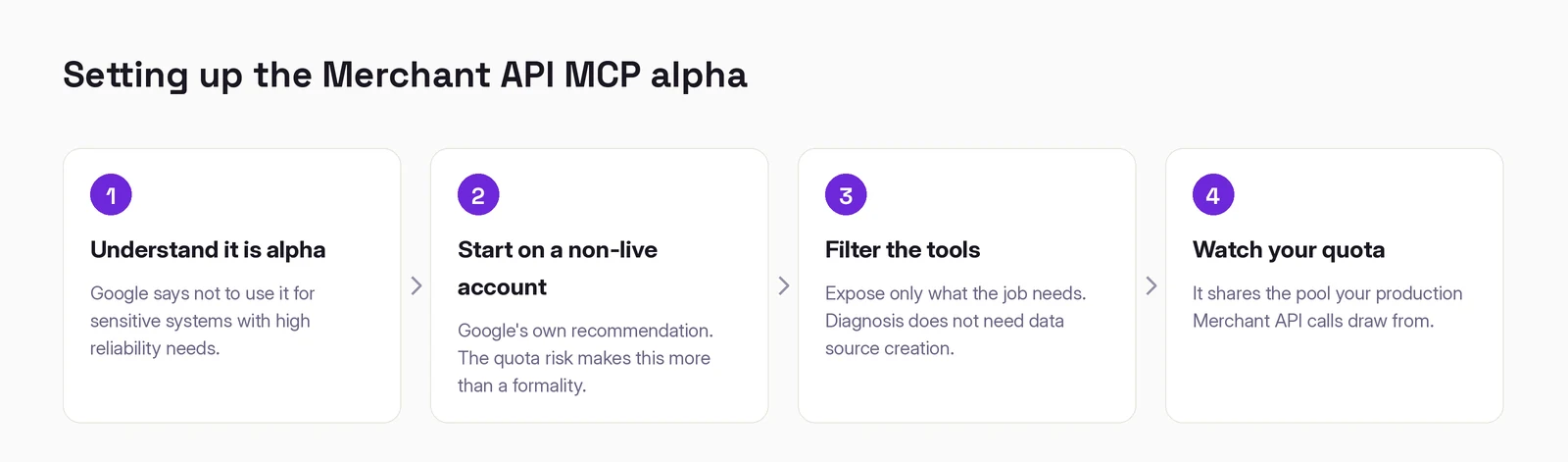
1. Read the alpha warning and decide honestly. Google's words: "We don't recommend using these features for sensitive systems with high reliability needs." For most retailers a product feed is a sensitive system with high reliability needs. That does not mean do not use it. It means do not point it at your live feed on day one.
2. Start on a non-live account. This is Google's own recommendation, and given the quota behavior described above it is more than a formality. Exhausting quota in a sandbox costs you an afternoon. Exhausting it in production costs you product visibility while you work out what happened.
3. Configure tool filtering rather than exposing the whole toolset. Also Google's recommendation, and the cheapest control available. An agent doing disapproval triage does not need data source creation, and an agent that cannot create data sources cannot make the one write that worried you.
4. Know your quota headroom before you start. If you do not know what share of your Merchant API quota your production systems consume on a normal day, you cannot reason about what is safe to add. Measure first, then add the agent, then watch the number.
A sensible first task, because it is pure read and immediately useful:
"List every product disapproval on this account, grouped by reason, with a count for each. Do not change anything."
What it can and cannot do
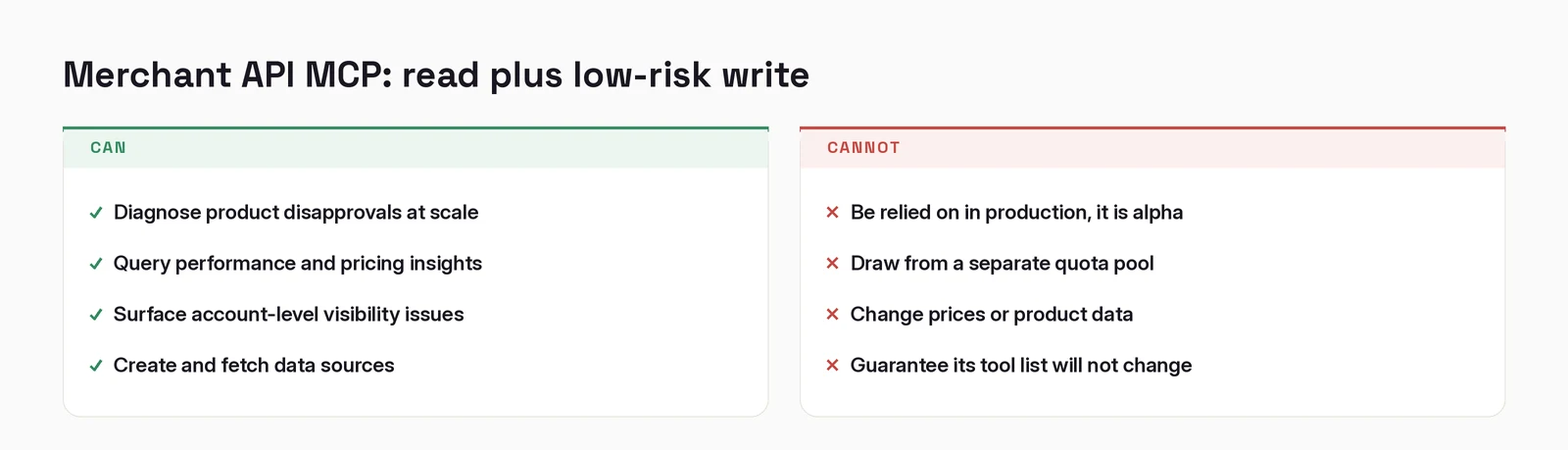
Note the second item on the right. The permission model here is genuinely thoughtful, read-only plus low-risk write is a more careful position than either extreme. The quota sharing is the part that is easy to miss and harder to undo.
When it does not work
"Quota errors appeared in my production systems." This is the failure this whole post is about. The agent and your production calls draw from the same pool. Pause the agent, let the quota recover, then reintroduce it with tool filtering and off your sync schedule.
"A tool that worked last week is gone." It is an alpha. Google says these features may change without notice, so do not build anything durable on today's exact tool list.
"It returns fewer disapprovals than the interface shows." Check whether you are querying the whole inventory or a single data source. The aggregate view and a per-source view answer different questions.
Working out where AI actually fits in your marketing?
I write these while building the systems behind them: measurement, creative pipelines, and agents that do real work. Connect on LinkedIn and tell me what you are working on. That is where these conversations start.
Connect on LinkedIn