
Google has published an official MCP server for the Google Ads API. It lets an AI assistant query your account in plain English, every campaign, ad group, keyword and metric, without you writing a line of GAQL or any custom glue code.
It also cannot change anything. From Google's own specification:
Mode: Read-only (current release)
Almost every piece of AI advertising content published this year promises the opposite. Autonomous bid management. Agents that pause underperformers. Campaigns written and launched without a human in the loop.
Google shipped the boring version, and the boring version is correct.
What it actually is
The server is a standardized bridge to the Google Ads API. Google's framing is that it "eliminates the need to write custom glue code for Google Ads API authentication, resource fetching, and data parsing." That is the real value, not intelligence, but removing the integration tax that previously made this a project rather than an afternoon.
| Specification | Value |
|---|---|
| Protocol | MCP (Model Context Protocol) |
| Mode | Read-only (current release) |
| Language | Python |
| Transport | stdio |
| Authentication | OAuth 2.0 or service account |
The interaction loop is unremarkable, which is the point. You ask a question. The model inspects its available tools, identifies the Google Ads search capability, the server queries the API, structured results land in the model's context, and it answers in English.
Source is github.com/googleads/google-ads-mcp, with community support in the #ads-api-ai-tools channel on Google's Advertising Community Discord.
Why read-only is the correct default
Consider what write access to a live ad account actually means.
An agent with mutate permissions is one ambiguous instruction away from pausing the campaign that was working. Not because the model is stupid, because it optimized for what you said rather than what you meant, and nothing in the loop caught the difference.
Now add the properties that make advertising specifically unforgiving:
It runs while you sleep. A bad code change sits inert until someone deploys it. A bad campaign change starts spending immediately and continues at 3am.
The feedback loop is slow and noisy. You will not notice a subtly wrong bid strategy for days, and when performance moves you will have several plausible explanations to choose from. There is no stack trace.
Undo is not undo. You can restore a paused campaign. You cannot restore the learning period, the auction position, or the four days of spend that went somewhere useless.
Compare that with the read-only failure mode: the model tells you something wrong, you notice it is wrong because you know your account, and you disregard it. Cost: thirty seconds.
The asymmetry between those outcomes is enormous. Google chose the side of it that does not produce incident reports.
What it is genuinely good at
Read-only sounds like a downgrade until you notice that the majority of skilled paid media work is analysis, not clicking.
Diagnosis. "Performance dropped last Tuesday, what changed?" is the single most common question in this discipline, and answering it properly means cross-referencing spend, impression share, auction insights and search terms across a date range. It is tedious, mechanical, and exactly what this is for.
Search term waste. Pulling search terms across every campaign, finding the queries consuming budget without converting, and grouping them into a negative list is hours of work that produces a list of words. The thinking is in deciding what to exclude, not in assembling the report.
Structural audits. Duplicate keywords competing against each other, ad groups with one keyword and no ads, forgotten experiments still running, conversion actions counting twice. These are findable by inspection and nobody has time to inspect.
Reporting in the shape you wanted. Not the shape the interface offers. The gap between those two things is where a surprising amount of analyst time disappears.
Comparison. Periods, segments, match types, devices, networks, without exporting anything to a spreadsheet first.
What you get is an analyst who answers instantly, never gets bored, and has read the whole account. Every judgment and every change remains yours.
The setup is a real project
Worth stating plainly, because most coverage omits it. You need:
- A developer token from the Google Ads Developer console, a 22-character string, and obtaining one requires an application and approval
- A Google Cloud project ID
- OAuth 2.0 credentials, or application default credentials
It runs locally via pipx, or you can deploy it to Cloud Run if you want to share one server across several agents. Neither path is a checkbox in a settings menu.
If you manage ads for clients, the account structure question arrives immediately: one server per account, or one across an MCC? Answer it before you start rather than after.
A word on the third-party servers
Several third-party Google Ads MCP servers exist and many of them do offer write access. Some are competently built.
But be precise about what connecting one means: you are granting an external service mutate permissions on an account with live spend, and the safety properties are whatever that vendor decided they should be. That is a due-diligence exercise, not an install.
The distinction to hold onto is that Google's official server made a deliberate choice to ship without write in the current release. A third-party server offering write has made the opposite choice. Neither is automatically wrong, but you should know which one you are running, and why.
The broader point
Every AI tool announcement is currently framed around what the model can now do autonomously. Autonomy is easy to build and easy to demo. It is the constraint that is hard, because a constraint requires deciding what the tool should refuse to do.
Google looked at read-write access to live advertising accounts and shipped read-only. For a first release aimed at an API where mistakes cost money in real time, that is not timidity. It is the most useful thing they could have done.
The best AI tool for paid media right now does not touch your campaigns. It just knows everything about them.
How to actually set it up
Set expectations first, because this is where people give up: this is not a click-Connect integration. Gmail and Drive are four clicks. The Google Ads MCP server is a developer setup, a Cloud project, a developer token, an OAuth client and a config file. Budget an hour the first time, and know that the hour is mostly Google's approval steps rather than anything technical.
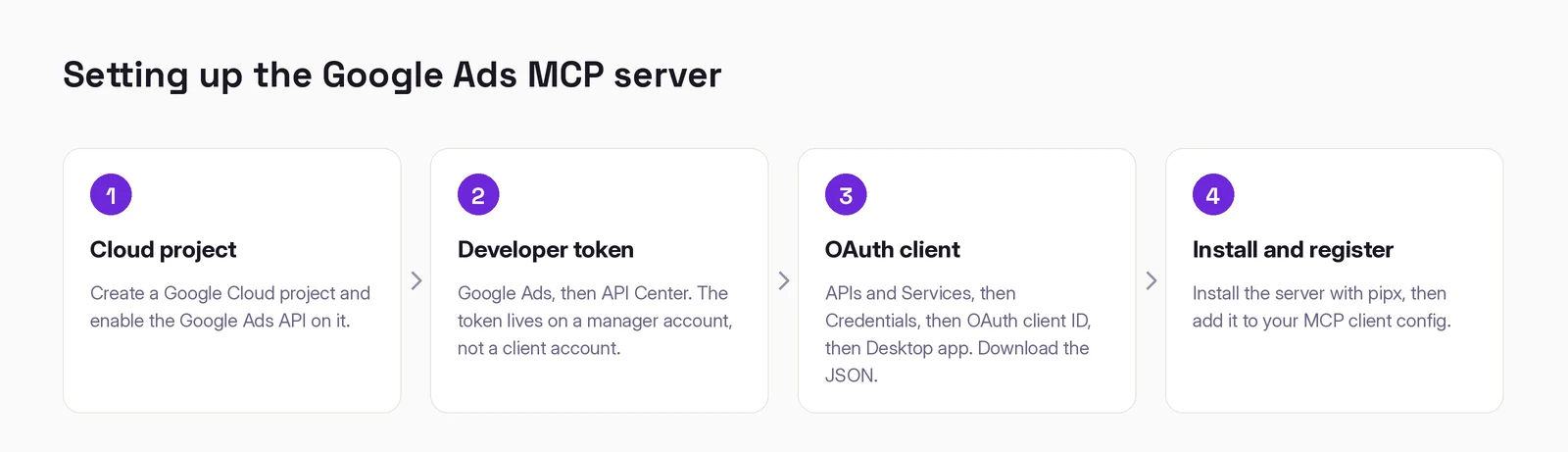
1. Create a Google Cloud project and enable the Google Ads API on it.
2. Get a developer token. In Google Ads, open the API Center. The important detail: the token lives on a manager (MCC) account, not on a client account. People without a manager account look for the API Center in the wrong place and conclude it has been removed.
Tokens are issued at access levels, and a test-level token only reaches test accounts. If everything appears configured and every query returns nothing, this is almost always why, the setup is fine, the token simply cannot see production data.
3. Create OAuth credentials. In Cloud Console: APIs & Services → Credentials → Create Credentials → OAuth client ID → Desktop app. Download the JSON.
4. Install the server and register it with your MCP client. The official server is googleads/google-ads-mcp; install it with pipx and add it to your client's MCP configuration, pointing GOOGLE_ADS_DEVELOPER_TOKEN at your token and GOOGLE_ADS_OAUTH_CONFIG_PATH at the JSON you downloaded.
One rule worth stating plainly: the credentials JSON, the developer token and the OAuth refresh token are secrets. They belong in a secret store or an untracked local file, never in a config file that gets committed. This is the most common way a developer token leaks.
What it can and cannot do
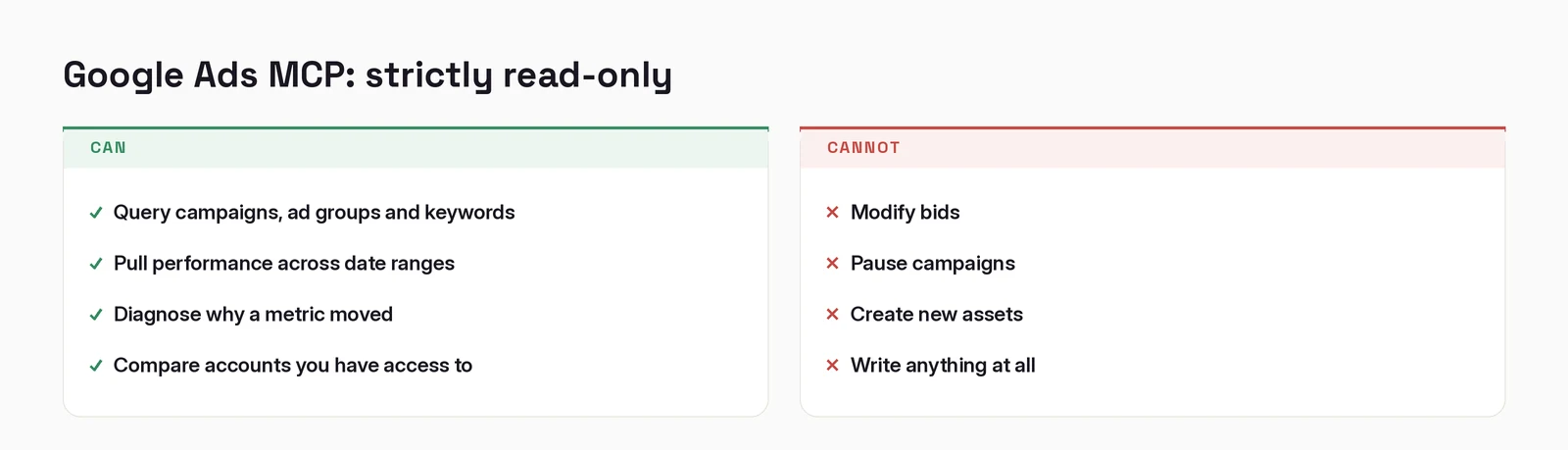
The right-hand column is not caution on my part. It is Google's own documentation: "This implementation is strictly read-only. It cannot modify bids, pause campaigns, or create new assets."
When it does not work
"Every query returns empty." Test-level developer token. See step 2.
"API Center isn't in my account." You are looking at a client account. It lives on the manager account.
"Authentication fails after it previously worked." Refresh tokens expire, and revoking access in the Google account security page kills them immediately. Re-run the OAuth flow.
"It cannot see one of my accounts." The token and the authorized user are two separate permissions. The user must have access to that account in Google Ads as well.
Working out where AI actually fits in your marketing?
I write these while building the systems behind them: measurement, creative pipelines, and agents that do real work. Connect on LinkedIn and tell me what you are working on. That is where these conversations start.
Connect on LinkedIn