
Google Analytics is the most complained-about tool in marketing, and almost all of the complaints share a shape. Nobody says "I wish I could edit GA4 faster." They say some version of "I know the answer is in there and I cannot get it out."
That distinction matters, because Google shipped an official MCP server for Google Analytics, and its documentation is explicit about the boundary:
"The MCP server is available for read requests only. It can't edit your Google Analytics configuration or settings."
Read-only. The same decision Google made with the Google Ads server.
For GA4 specifically, that is not a compromise. It is a near-perfect match to the actual problem.
The problem is translation, not editing
Your data is in GA4. The events fired. The conversions recorded. Sessions are being counted.
Getting a straight answer out of it requires knowing which report to open, which dimension to apply, which filter narrows without distorting, and why the number in this view disagrees with the number in that one. That is a translation problem, from a question in English into the specific arrangement of GA4's interface that answers it.
Nobody's GA4 frustration is that they lack write access. It is that the distance between having a question and having an answer is four menus and twenty minutes, and that distance is where most analysis quietly dies.
Which is exactly what a read-only natural-language layer removes.
The compounding effect is the second question
Here is the part that is easy to underrate.
Most analysis stops at question one. Not because the analyst lacks curiosity, but because question two costs another twenty minutes of report building, and there is a meeting at three.
"Conversions dropped 12% last week" is where it usually ends. The valuable version continues: Which channel? Was it traffic or rate? Did it start on a specific day? Does that day line up with anything? Is one landing page carrying the whole drop?
Each of those, in the interface, is another Exploration. Conversationally, each is a sentence. When the marginal cost of the follow-up approaches zero, you keep pulling the thread, and the insight is almost never in question one. It is three or four questions down, where nobody had time to go.
What it is good for
Diagnosis. "Why did conversions fall last Tuesday" is the single most common question in analytics and the most tedious to answer properly, because answering it means checking six things in sequence to eliminate five of them.
Discrepancy hunting. GA4 says one number, the ad platform says another, and both are technically correct because they count differently. Having something that can hold both models simultaneously and explain where they diverge is genuinely useful.
Measurement audits. Which events are still firing. Which conversions have quietly gone to zero. Which custom dimensions were configured once and never used. These are findable by inspection, and nobody has time to inspect.
Reporting in the shape you wanted rather than the shape the interface offers.
Two honest limits
The setup is real. Service account credentials, read-only scopes, and the MCP client configuration. It is an integration, not a settings toggle. Budget an afternoon.
It will not fix bad measurement. This is the important one. If your events were tagged incorrectly, your conversions double-count, or your channel groupings are wrong, you have not bought insight, you have bought a faster route to confidently wrong numbers, delivered in fluent prose.
Garbage in, articulate garbage out.
That is arguably more dangerous than the old friction, because the old friction was itself a check. When building the report took twenty minutes, you looked at the numbers along the way and sometimes noticed they were nonsense. A fluent answer invites less scrutiny than a spreadsheet does.
So the prerequisite has not changed: your measurement has to be sound before any of this helps. What has changed is what sound measurement is now worth.
The shift
For years the constraint on analytics was not data availability. It was the cost of asking. Organizations responded by building dashboards, pre-answering the questions someone predicted you would have, which works right up until you have a different question.
A read-only conversational layer inverts that. You stop maintaining answers to anticipated questions and start asking actual ones.
That is a smaller claim than "AI will do your analytics." It also happens to be the thing that was actually broken.
How to actually set it up
As with the Google Ads server, this is a developer setup rather than a click-Connect integration, a Cloud project, two APIs and a credentials file. It is a shorter path than the Ads one, because there is no developer token to request and therefore no approval to wait on.
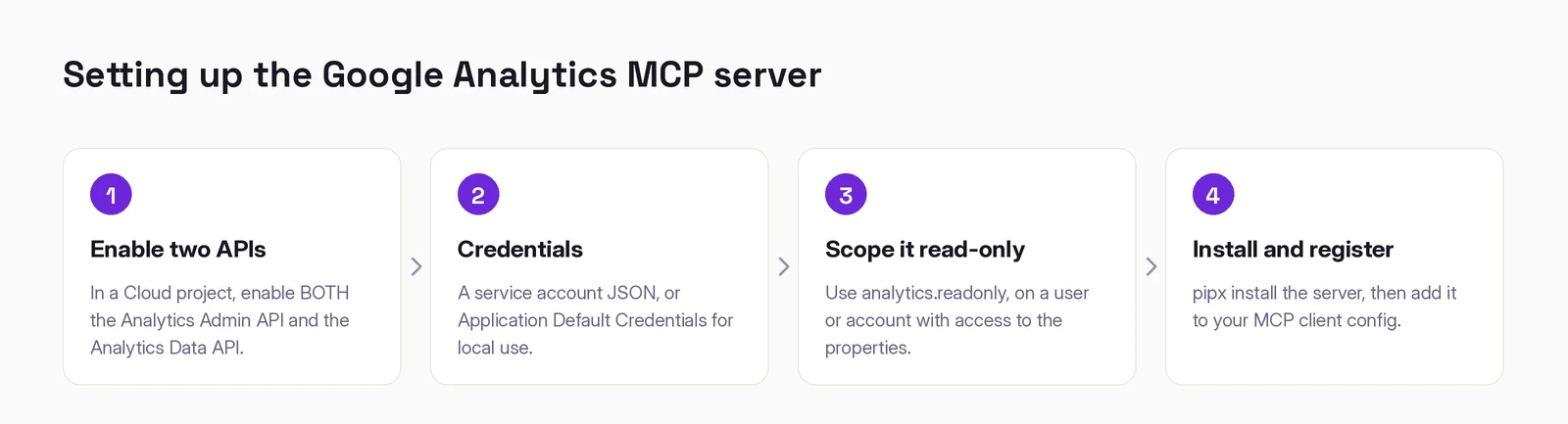
1. Enable two APIs in a Google Cloud project, the Analytics Admin API and the Analytics Data API. Both. Enabling only the Data API is the most common setup error: the server starts, connects, and then cannot list your properties, because property discovery is an Admin API call.
2. Set up credentials. A service account JSON for a headless setup, or Application Default Credentials if you are just running it locally. Either works.
3. Scope it to analytics.readonly, on a user or service account that actually has access to the GA4 properties you care about. Two separate things have to be true: the credential must be valid, and the identity behind it must be able to see the property. Setting up the first and forgetting the second produces an authenticated client that can see nothing.
4. Install and register the server. The official server is googleanalytics/google-analytics-mcp, Apache-2.0. Install it with pipx and add it to your client's MCP configuration with the path to your credentials and your Cloud project ID.
What it can and cannot do
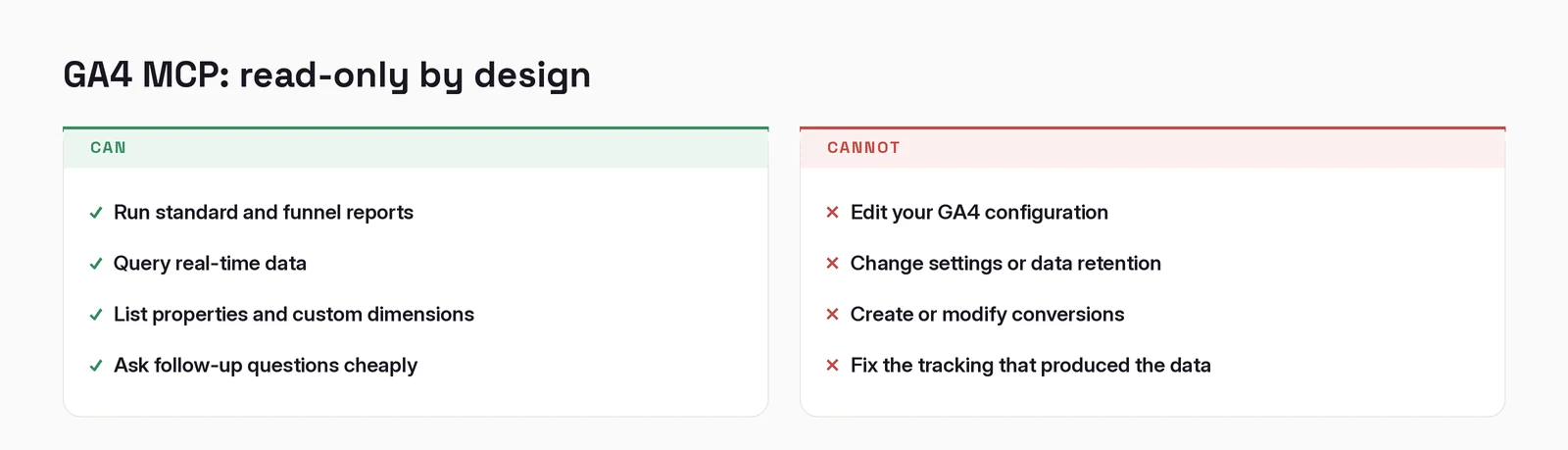
Read-only is enforced by the analytics.readonly scope, not by a policy someone might relax. For GA4 that constraint is a near-perfect fit, which is the argument this whole post makes.
When it does not work
"It connects but lists no properties." The Admin API is not enabled. See step 1.
"It lists properties but every report is empty." The identity behind the credential does not have access to that property. Check in GA4's own admin, not in Cloud Console.
"It cannot find a metric I know exists." Custom dimensions and metrics have API names that differ from their display names. Ask the server to list them, then use the name it returns.
"The numbers disagree with the GA4 interface." Usually a date range or a default filter in the UI that the API call does not have. Ask for the exact range and compare like with like before assuming either is wrong.
Working out where AI actually fits in your marketing?
I write these while building the systems behind them: measurement, creative pipelines, and agents that do real work. Connect on LinkedIn and tell me what you are working on. That is where these conversations start.
Connect on LinkedIn