
On 18 August 2026, Anthropic's Gmail connector crossed a line it had been sitting behind since launch. Claude could already read your inbox, search it, and draft replies. Now it can send them.
That is the headline, and it is the least interesting thing about the change.
The interesting part is the permission model wrapped around it, because that is the difference between a useful assistant and a liability with your name in the From field.
What the connector actually does
From Anthropic's Google Workspace connector documentation, the Gmail capabilities are:
| Capability | Available |
|---|---|
| Search and read email | Yes |
| Draft replies with full thread context | Yes |
| Send email on your behalf | Yes: new as of 18 Aug 2026 |
| Manage labels and threads | Yes |
| List saved drafts | Yes |
Available to all users on Claude and Claude Desktop. Google Calendar and Google Drive connect the same way, and the Drive side gained its own write capabilities on the same date, share, move and trash.
The permission model is the product
Here is the line from the documentation that deserves more attention than the feature announcement:
"By default, Claude asks for your approval before each of these actions. On Team and Enterprise plans, owners decide whether members can allow these actions to run without asking each time."
Two things are doing work there.
Approval is the default, not an option you have to find. The safe configuration is what you get before you touch anything. That is the correct way round, and it is not how every integration in this category ships.
Auto-approval is an admin decision on team plans, not an individual one. An employee cannot unilaterally decide that Claude may send email as them without asking. Whether that matters to you depends entirely on whether you have ever worked somewhere that a well-meaning person turned off a safety prompt because it was slowing them down.
Why "it asks first" is the whole argument
Email is not a document. It is an irreversible outbound action attached to your professional identity.
A bad draft costs you nothing. A bad send costs you a client relationship, a negotiating position, or a compliance incident, and there is no undo that meaningfully helps. The asymmetry between those two outcomes is enormous, and it does not shrink as the model gets better, because the failure mode is not "the model wrote something stupid." It is "the model wrote something reasonable that was wrong for a context it could not see."
It does not know that the client is already annoyed. It does not know you agreed something different on a call. It does not know the person you are cc'ing left the company. It knows the thread.
Approval is where your context re-enters the loop. That is not friction to be optimized away. That is the mechanism working.
What this is genuinely good for
Thread archaeology. The single best use. A long thread with five participants and three reversals, reduced to what was decided and what is still open. This is the task that quietly consumes twenty minutes before every client call.
Finding the email you half remember. Not keyword search, description search. "The one where someone attached a revised scope and pushed the timeline." Traditional search fails at this because you cannot remember the words that were used, only the shape of what happened.
Drafting with the whole thread as context. The value is not that it writes faster than you. It is that it has read all fourteen messages before writing, which, if you are honest, you frequently have not.
Triage. Which of these 200 unread actually require you, versus which are notifications wearing a subject line.
How to configure it sensibly
Connect Gmail from the connectors menu in Claude. Then, before you use it in anger:
Leave approval on for send. The time saved by auto-approve is a few seconds. The exposure is unbounded. This is not a close call.
Be more careful again on shared or role mailboxes. Anything handling payroll, legal matters, customer contracts or credentials should not have unattended send enabled at all, by anyone.
Read the draft, not the summary of the draft. The failure mode is skimming an approval prompt because the last nine were fine. Approval only works if it is real.
The actual shift
Every AI tool announcement is currently framed as capability: it can now do X. The capability is rarely the hard part.
What determines whether these tools are usable inside a real business is the boundary around the capability, what happens by default, who decides, and whether the vendor designed for the case where the model is confidently wrong.
On that measure this release is more interesting than "Claude can send email." It is a company shipping a genuinely useful capability with the brakes on by default, and telling you not to take them off.
That is a reasonable thing to expect from every tool you connect to your inbox. Most of them will not offer it.
How to actually set it up
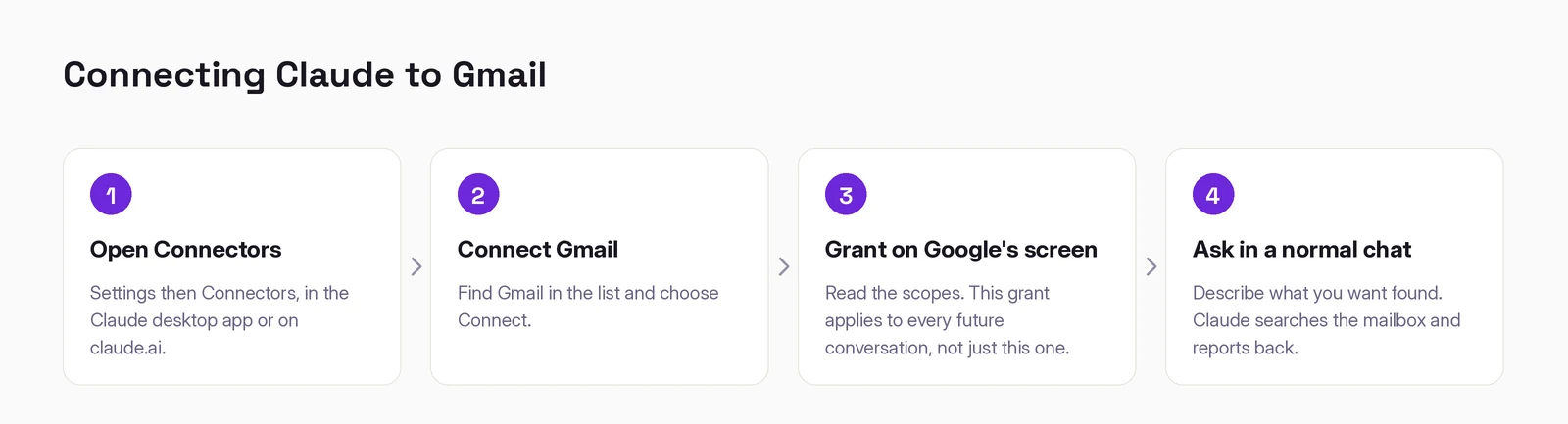
1. Open Settings → Connectors. Desktop app or claude.ai. The Google Workspace connectors are available on all plans, free included, so you do not need to upgrade to try this.
2. Find Gmail and choose Connect.
3. Read Google's consent screen before approving. This is the only place the scopes appear, and the grant applies to every future conversation rather than the one you are about to have. For a mailbox, that is worth ten seconds of attention.
If you are on a work Google Workspace, an admin may have blocked third-party app access. It surfaces as a generic error rather than a permissions message, so people debug the wrong thing for an hour. On a work account, rule this out first.
4. Ask for something in a normal chat. Describe what you want found rather than naming a search syntax.
"Find the thread with the agency about Q4 budget. Summarize where it actually landed and what I still owe them."
If that comes back with the real thread, you are connected.
What it can and cannot do
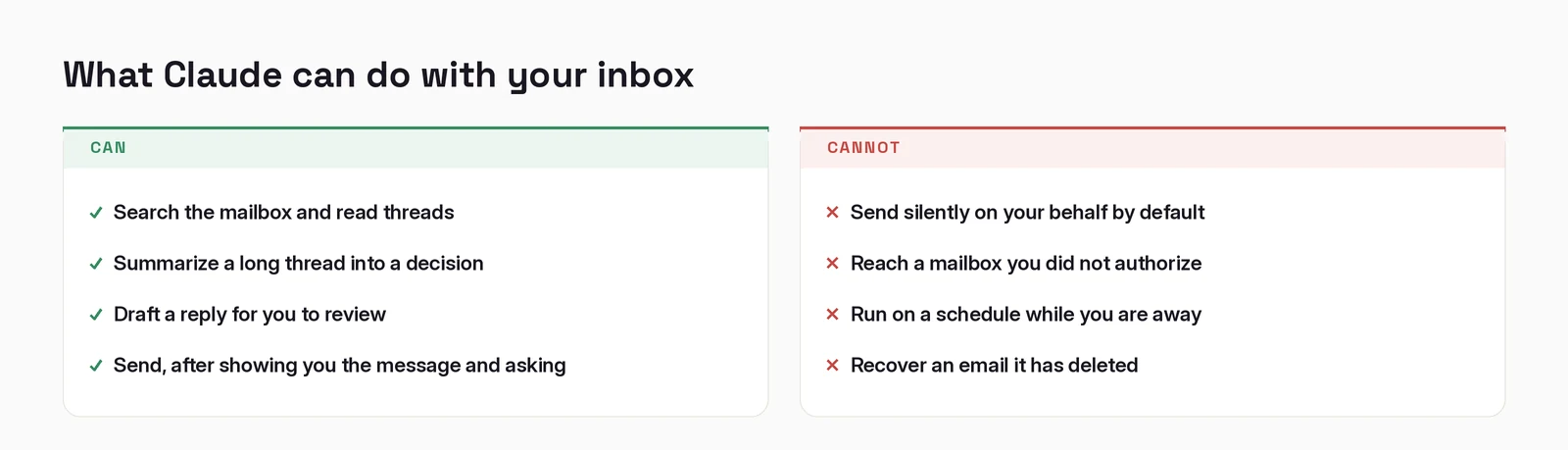
The line that matters most is the last one on each side. Claude can send, and by default it shows you the message and asks first. That default is the entire subject of this post, and it is the reason the connector is usable at all.
When it does not work
"I don't see Connectors." On Team and Enterprise plans an Owner or Primary Owner has to enable them at the organization level before anyone can authenticate. That is the usual cause, and it is not something you can fix from your own settings.
"It cannot find an email I know exists." Check you connected the right account. A personal and a work Google account are different mailboxes, and connecting one does not reach the other.
"It keeps missing older threads." Say so explicitly, give it a date range or the other person's name. Vague searches return vague results.
"It worked and now it doesn't." OAuth grants expire and admins revoke them. Disconnect and reconnect in the same menu before assuming a bug.
Working out where AI actually fits in your marketing?
I write these while building the systems behind them: measurement, creative pipelines, and agents that do real work. Connect on LinkedIn and tell me what you are working on. That is where these conversations start.
Connect on LinkedIn