
Most of what looks like knowledge work is not one task. It is a chain of small ones strung across four applications, none of which requires thought.
Read the thread to remember what was agreed. Check the calendar for real availability. Dig out the file they asked about. Draft the reply. File the attachment somewhere you will find it again.
Five applications. Twenty minutes. Almost none of it was thinking.
Claude's Google Workspace connectors, Gmail, Calendar and Drive, now handle that entire chain from a single request. That is a smaller announcement than it sounds and a much larger shift than it sounds, and it is worth separating the two.
What actually happens
The mechanism is described plainly in Anthropic's documentation:
"Ask Claude a question that requires access to your Gmail, Calendar, or Drive. Claude automatically detects which tools it needs and uses them to respond."
So a request like:
"Read the thread from Sarah, check my availability next week, draft a reply proposing two times, and save her attachment to the client folder."
resolves into four tool calls across three services, in the right order, with the output of each feeding the next. It reads the thread. It checks genuine availability across attendees. It drafts using the thread as context. It files the document.
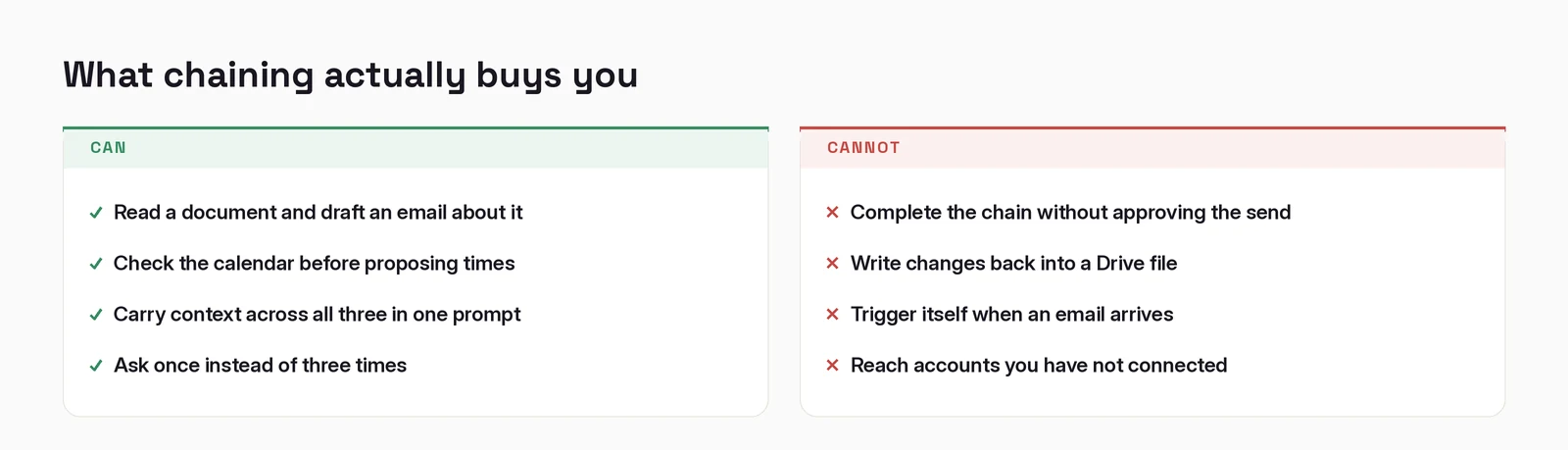
Then it stops, and asks, before anything is sent or moved.
Responses come back with citations indicating which emails, events and documents were used, linked to the originals, which matters more than it might seem, because a chained action is harder to audit than a single one.
The shift is in the unit of work
For thirty years, the interface contract with software has been: you decompose the problem, then issue the steps. You know the reply requires checking the calendar, so you open the calendar. The decomposition was your job. It was so obviously your job that it stopped looking like work.
Chained tool use inverts that. You state the outcome. The decomposition happens on the other side.
This is why "it saves you time" undersells it. The time saved on any single chain is maybe fifteen minutes. The change is that a category of thinking (what are the steps here) moves off your plate. And that category was consuming far more attention than the individual steps ever did, because it ran constantly, in the background, all day.
The cost of context switching was never the switching. It was holding the map.
Where this earns its keep
The chains worth automating share a shape: mechanical, frequent, and spanning tools.
Meeting preparation. Pull the last thread with these attendees, summarize what was agreed, check what documents were shared, and tell me what is unresolved. Runs before every external call, and almost nobody does it consistently.
Follow-up after a call. Draft the recap from the thread, propose next times from real availability, attach the document that came up.
Inbox triage with context. Not just what is unread, but what is unread and references something on this week's calendar.
Filing. The one everyone skips. Attachments live in your inbox forever because downloading and filing them is three steps too many.
The risk, stated plainly
Chained actions mean more happens per approval. That is the entire benefit and the entire risk in one sentence.
A single-step assistant proposes one thing and you evaluate one thing. A chained assistant proposes a sequence, and the temptation is to evaluate the intent rather than the steps, to think "yes, that is broadly what I asked for" and approve.
Three practical guards:
Read what it proposes, not what you asked for. These are different objects. The gap between them is the entire risk surface.
Keep approval on for anything leaving your machine. Sending, sharing, moving, deleting. Reading is safe; acting is not. On Team and Enterprise plans, admins control what members may auto-approve, use it.
Use the citations. Claude reports which emails, events and files it drew on. If a chain produces something surprising, that trail is how you find out whether it read the wrong thread.
The honest limitation
This works because the tools are connected to one identity. In practice, connectors authorize one Google account at a time. Chains spanning a personal and a work account, or two client accounts, do not compose the way you would want.
And the chain is only as good as the request. "Sort out my inbox" produces nothing useful. "Read the thread from Sarah, check next week, propose two times" produces something you can approve in five seconds. Specificity moved, it did not disappear.
What to take from it
The feature is chained tool use across Gmail, Calendar and Drive. Fine.
The thing worth internalising is that the interface contract changed. You are no longer operating software. You are delegating outcomes to something that decides the steps, and your job shifts from doing the sequence to specifying it well and reviewing what comes back.
That is a genuinely different skill. It is closer to briefing a capable new hire than to using a tool. Most people are still writing prompts as though they are issuing commands, and getting command-shaped results.
How to actually set it up
The chain needs all three connectors. Missing one does not produce an error, it produces a worse answer, which is harder to notice.
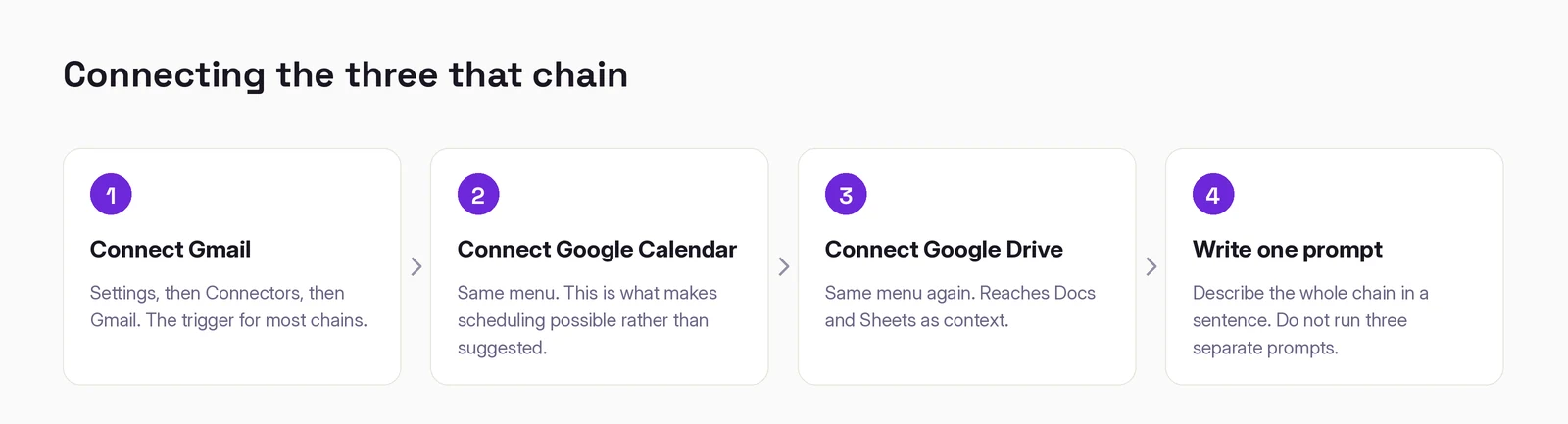
1–3. Connect Gmail, Google Calendar and Google Drive. Settings → Connectors, three times, same OAuth flow each time. Available on all plans. Read each consent screen; the scopes differ.
4. Write one prompt that spans all three. This is the step people get wrong. Running three separate prompts and pasting between them gets you none of the benefit, the value is that context carries across the whole chain.
"Read the Q4 planning doc in my Drive, find the email thread where the agency responded to it, and draft a reply that answers their three objections. Check my calendar and propose two times next week for a call."
One prompt. Three systems. One thing to review at the end.
What chaining actually buys you
When it does not work
"It ignored one of the systems." Usually that connector is not actually connected. Check all three show as connected rather than assuming.
"It found the wrong document." Name it precisely, or say which folder. Drive search is doing the same fuzzy matching you would do by hand.
"It drafted the email but did not send it." Working as designed, the send is gated on your approval. If you want it sent, approve it.
"The calendar times it proposed are wrong." Check the time zone on the calendar it connected to. This is the single most common cause and it is almost never the model.
Working out where AI actually fits in your marketing?
I write these while building the systems behind them: measurement, creative pipelines, and agents that do real work. Connect on LinkedIn and tell me what you are working on. That is where these conversations start.
Connect on LinkedIn