
In October 2026, Google, Meta and OpenAI changed how their ad tools work, and the rules around them. 2 of the changes are on by default: OpenAI's rewrites of ChatGPT ads, and Google's videos in new Performance Max campaigns. Meta said ad sets with too few conversions cost about 28% more per purchase in its data, and by November 5 it had paused its new AI ad terms.
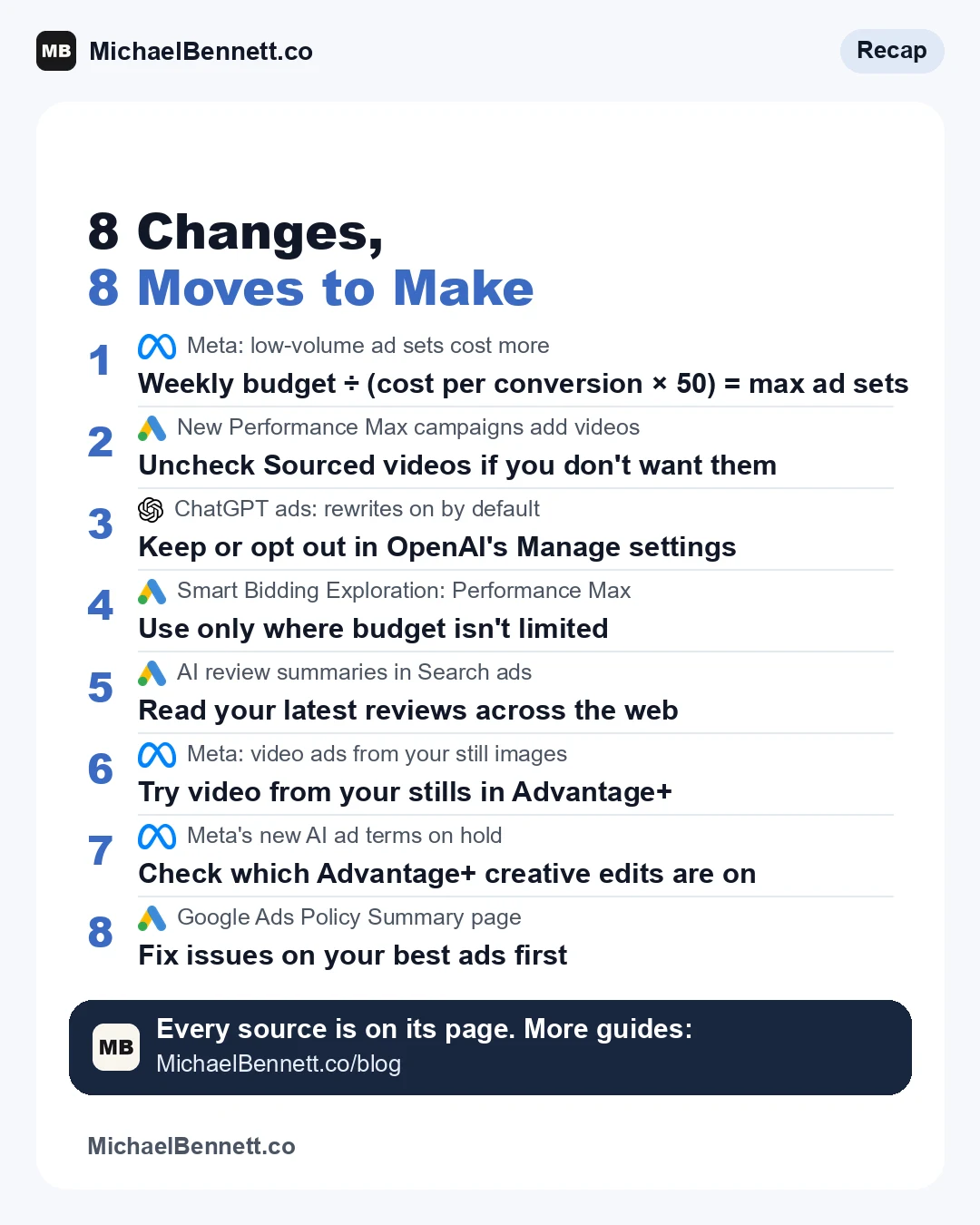
Here are 8 changes from October, each with what changed, what it means for your ads and 1 move to make. The facts come from the platforms' own pages, most of them read on November 5, 2026. Where only trade press reported something, it says so, and where the reasoning is ours, it says "Our read". 3 October headlines were out of date by then, so this post uses the corrected versions: Meta's new AI terms never took effect, OpenAI's start date is October 30, and Google's video default is for new campaigns.
The 8 at a glance
| No. | Change | On by default? | Your move |
|---|---|---|---|
| 1 | Meta: ad sets under about 50 conversions a week pay about 28% more per purchase, in Meta's data | Guidance, not a setting | Run Meta's ad set formula |
| 2 | Google: new Performance Max campaigns can add your videos | Yes, in new campaigns | Uncheck Sourced videos if you don't want them |
| 3 | OpenAI can rewrite your ChatGPT ads | Yes, since October 30 | Keep it or opt out in OpenAI's Manage settings |
| 4 | Google: Smart Bidding Exploration in Performance Max and Shopping | No, you opt in | Use it only where budget isn't limited |
| 5 | Google: AI review summaries in Search ads | Automatic; the help page lists no opt-out | Read your latest reviews |
| 6 | Meta: video ads from your still images | Open to all; Meta doesn't say it's on by default | Try it on your next ad |
| 7 | Meta: new AI ad terms on hold | The old terms still apply | Check which Advantage+ creative edits are on |
| 8 | Google Ads: 1 page for policy issues | Google doesn't say who has it | Fix your best ads' issues first |
1. Meta: ad sets under about 50 conversions a week pay about 28% more per purchase, in Meta's data
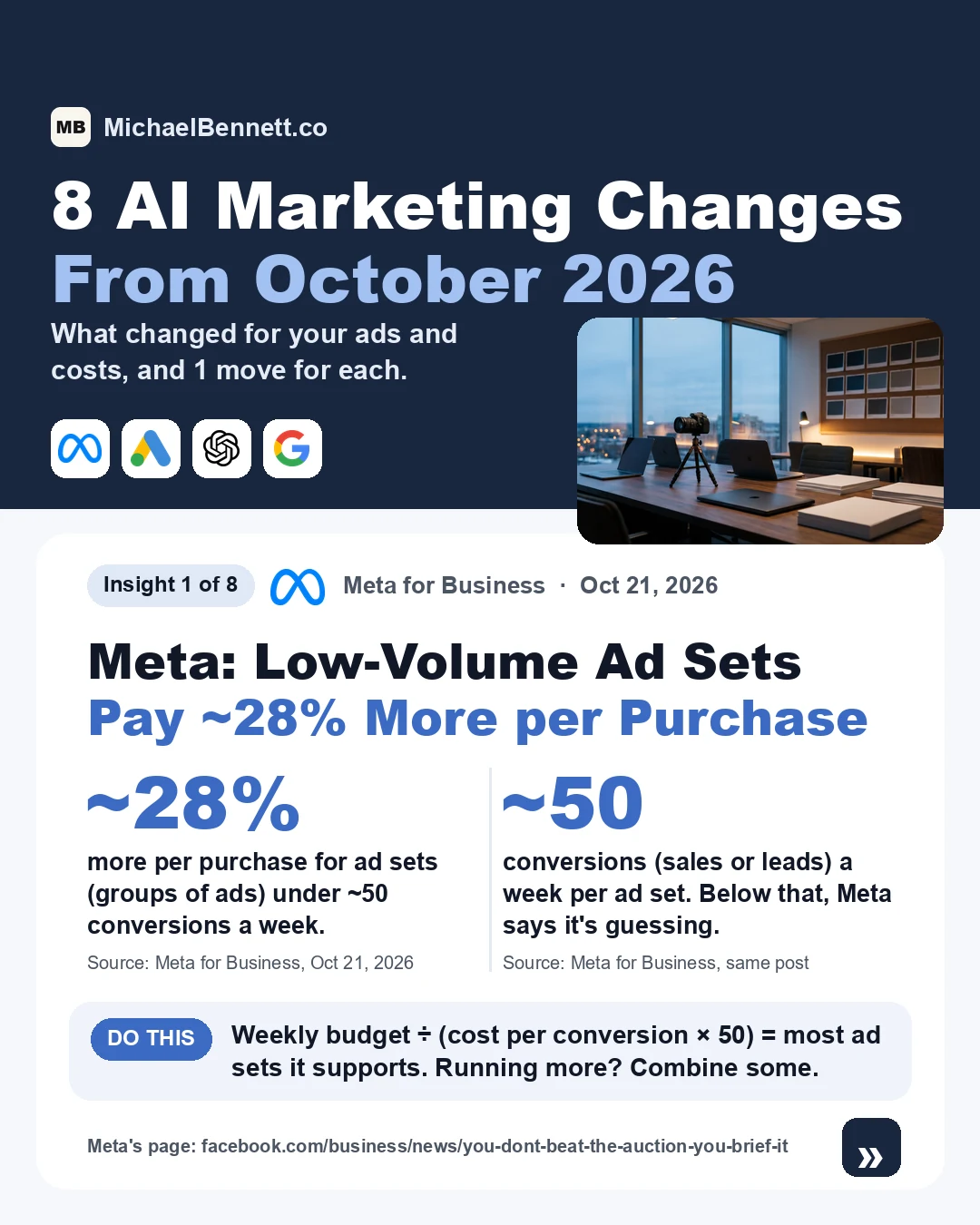
What changed. This one is a number, not a setting. On October 21, 2026, Meta published its peak-season advice with a figure from its own data. An ad set is a group of ads inside a campaign, and it's the level Meta's system learns at. Meta: “Give each ad set enough volume to learn from. Roughly fifty conversions a week. Below that the system is guessing. In our analysis, ad sets under that threshold ran about 28% more expensive per purchase.”
The caveat. “In our analysis” is all Meta says about the method. It gives no sample, time period, region or industry, so treat about 28% as the size of the gap in Meta's data, not a forecast for your account.
What it means for your ads. Our read: if your budget is split across many small ad sets, some of them may never reach about 50 conversions a week.
Your move. Run Meta's formula: “Total weekly budget ÷ (cost per result × 50) = the most ad sets your budget can support”. Meta adds: “Most accounts are running more than that.” For example, a $7,000 weekly budget at a $35 cost per result supports 4 ad sets, because 7,000 ÷ (35 × 50) = 4. Running more than that? Combine some, and make the changes in 1 batch, as Meta advises (its "brief" is what you optimize for, how hard the system should chase it, and how you want results counted): “Group your changes. If you're going to rebrief, do it all at once. Take one learning phase instead of five. Then hold it still.”
2. Google: new Performance Max campaigns can add your videos on their own
What changed. Performance Max is Google's campaign type that runs across all of Google's ad channels from 1 campaign. Google's help page: “Sourced videos are enabled by default for all new campaigns.” Google AI finds videos on the sources you approve: social media platforms, your campaign's landing page and your linked YouTube channel. “Up to 10 crawled videos can be automatically added to an asset group.” An asset group is the bundle of images, videos and text that Performance Max mixes into ads.
Existing campaigns, maybe. The default is for new campaigns. But if you see the setting on where nobody turned it on, Google says “it may have been activated automatically on some existing campaigns as part of a recent platform update”, with no date for that update. Google also says “This feature is rolling out in sequences and may not be available to you yet.” Campaigns need a daily budget above $5.
Where the videos go. “Sourced videos will be uploaded to a dedicated Google-owned YouTube channel.” Google says that channel carries your logo and business name and sends viewers to your landing page.
Next: images, from December 4. Google Ads Developer Blog, October 21, 2026: “Starting December 4, 2026, image extraction (GENERATE_IMAGE_EXTRACTION) will be enabled by default (OPTED_IN) for newly created Performance Max campaigns”. Image extraction pulls images from your landing pages into your ads, and Google adds that “this new campaign-level default applies even if Dynamic Image Extensions are disabled at the account level”. “Existing Performance Max campaigns will retain their current configurations”. Google also asks you to “confirm that you own all legal rights or permissions to the images published on your landing pages”.
Your move. To turn the videos off, open your Performance Max campaign's settings (the gear icon next to it), open Asset optimization, uncheck Sourced videos and select Apply. To keep them, use Manage sources in the same place to review which URLs Google can pull from. Check your existing campaigns too. For December 4: Google says the new default applies in the Google Ads interface and Google Ads Editor too, not only the API. If a tool or agency builds your campaigns through the Google Ads API, they need to set image extraction to OPTED_OUT on each new campaign if you don't want it. Google's post gives that API setting; we found no Google page that names the switch in the Google Ads interface.
3. OpenAI can rewrite your ChatGPT ads by default, since October 30
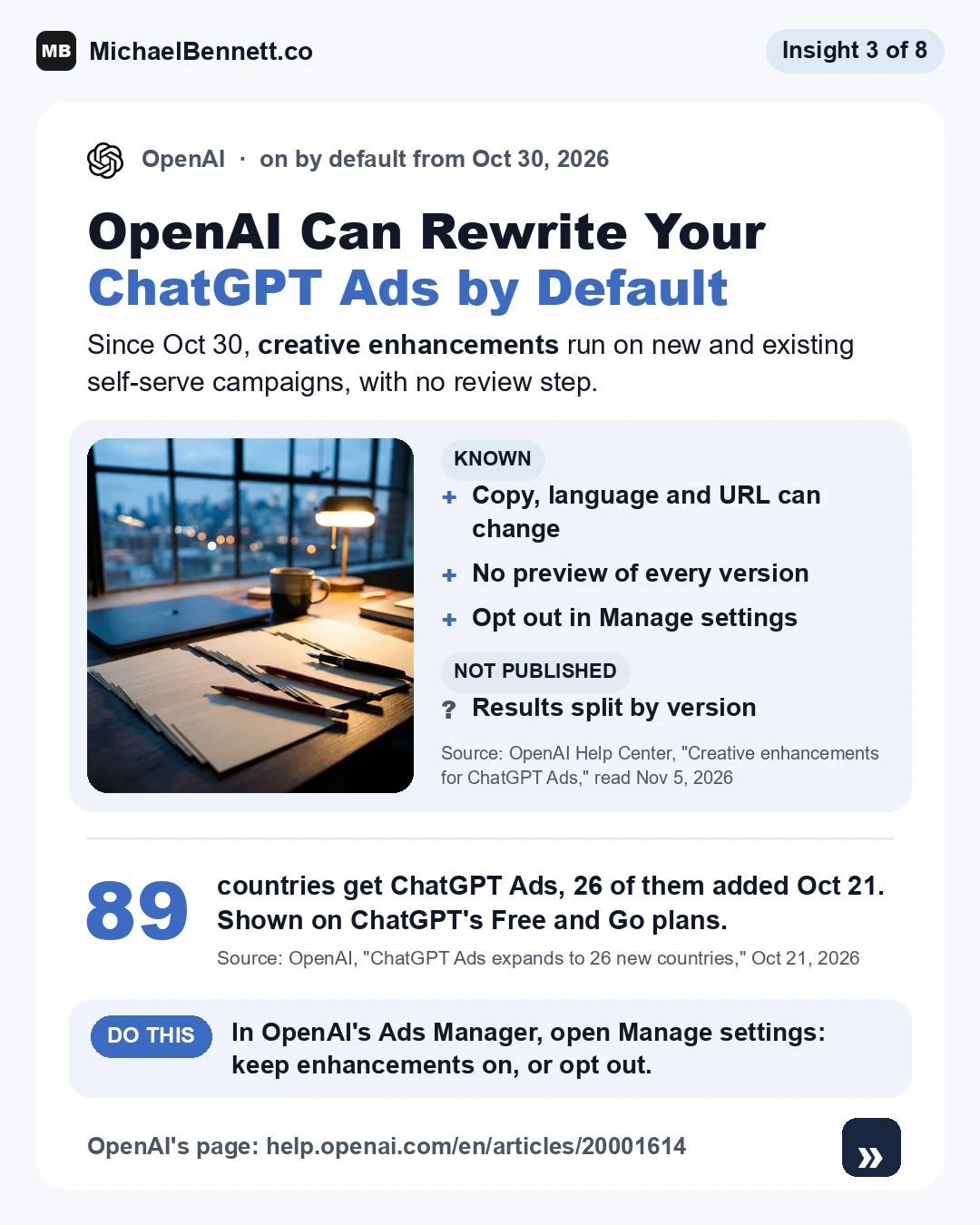
What changed. OpenAI's help page: “Creative enhancements are enabled by default for new and existing self-serve and BPO campaigns starting October 30, 2026. This does not affect sales-managed accounts.” If you buy ChatGPT ads yourself in OpenAI's Ads Manager, this covers you; accounts managed by OpenAI's sales team are excluded. Some October reports gave October 29. OpenAI's page says October 30, and so does its email to advertisers, as published by Search Engine Roundtable.
What can change, per OpenAI: new or updated headlines and descriptions, a translation into another language, resized images, and the destination URL, which “may be optimized to direct people to a relevant page on your website”. OpenAI's own example turns the headline “Fresh groceries delivered” into “Groceries for quick weeknight dinners”.
No review step. “You do not need to review or approve each enhanced version before it runs. The experience does not provide a preview of every variation.” On results, OpenAI says: “These metrics describe overall performance. Changes over time do not, on their own, establish the effect of creative enhancements.” Our read: OpenAI's help page lists no report that splits results by version, so the page gives you no way to tell which rewrite worked.
Where these ads run. On October 21, 2026, OpenAI added 26 countries, bringing ChatGPT Ads to 89. “Ads will appear only on the Free and Go plans. Plus, Pro, and Enterprise subscriptions will remain ad-free.”
Your move. In OpenAI's Ads Manager (ads.openai.com/settings), select Manage settings and decide: keep enhancements on, or opt out. If you opted out before, OpenAI says: “Existing account- and campaign-level opt-outs are preserved. Campaign-specific settings take priority over your account default.” Our read: if you keep them on, OpenAI's advice matters more, because the rewrites start from “your existing ad and landing-page content”: “Keep your ads and landing pages current, including prices, promotions, product details, and availability.”
4. Google: Smart Bidding Exploration now works in Performance Max and Shopping
What changed. Target ROAS (return on ad spend) is the bid strategy where you tell Google the return you want, such as 200%, which means $2 in conversion value for every $1 you spend. Smart Bidding Exploration lets that target dip so Google can win searches it was missing: “Smart Bidding Exploration lowers your target ROAS by up to the tolerance you select. This provides the algorithm with the flexibility to bid higher on high-potential queries.” Google's help page now covers Search, Shopping and Performance Max, and “Campaigns must use Target ROAS bidding.” The page is undated; Google's Ads Liaison said on October 15 that it was rolling out, as reported by PPC Land.
How far it drops. “You can choose a Target ROAS tolerance between 5% and 30%.” In Google's example, a 200% target with a 10% tolerance becomes an effective target of 180%, and “You can expect to come within approximately 15% of that 180% effective target when assessing performance over 1 to 2 conversion cycles.” A conversion cycle is the time from click to sale.
“In Performance Max campaigns with a Google Merchant Center feed, a single toggle turns on exploration on both Search and Shopping traffic.” Without a feed, it covers Search traffic only. And it isn't broad match by another name. Google says it doesn't expand your broad match keywords: “It helps you capitalize on long-tail queries you already qualify for but missed due to tight Target ROAS constraints.”
Your move. Google's condition: “Campaigns using Smart Bidding Exploration shouldn’t be limited by budget. Budget constraints block the algorithm from exploring new traffic areas. If a campaign hits a budget limit, the system may temporarily pause exploration.” So turn it on only where the campaign isn't limited by budget, and keep Shopping and Performance Max on campaign-level bid strategies, not a portfolio strategy shared across campaigns: “Moving these retail campaign types to a portfolio bid strategy will automatically deactivate Smart Bidding Exploration.” Our read: pick the smallest tolerance you could live with if the extra sales don't come, and judge it over the 1 to 2 conversion cycles Google names, not after a few days.
5. Google: your Search ads can show AI review summaries
What changed. Google's help page describes AI summaries of your reviews inside your Search ads: “Google AI automatically aggregates online reviews from across the web to generate review summaries. These summaries are positive only, and represent customer experiences and key insights about your business.” They show in Search campaigns, in all ad positions on Google.com, in the US, Australia, the UK and India, in English. Google's page covers “All advertiser verticals except sensitive categories, such as pharmaceuticals”.
You can't edit them. “Because review summaries represent user feedback, advertisers cannot directly edit or customize the generated text.” Google decides when they appear: “Google only showcases review summaries when it's predicted to improve ad performance.” The page gives no start date and no way to turn them off, and it doesn't name the review sites. Trade press first reported the page on October 24, 2026.
Your move. Read your latest reviews across the web, on the sites your customers use. Our read: Google keeps only the positive points, taken from reviews across the web, so what customers write there can now show up in your Search ads.
6. Meta: Advantage+ creative can turn your still images into video ads
What changed. At Advertising Week New York on October 6, 2026, Meta said that making video from your still images in Advantage+ creative, its set of automatic ad tools, is “now generally available”, which means open to every advertiser. Turning catalog product images into product videos is still a beta: “Eligible beta advertisers can access this”.
Why Meta is pushing video. The same post says, in a sentence that gives no date range: “More than 60% of the time people spend on Facebook and Instagram is with video”.
Your move. On your next ad, look for the video-from-images option in Advantage+ creative and preview what it makes. Our read: under the Meta terms still in force (change 7), you answer for AI output you choose to use, so watch each video before it runs.
7. Meta's new AI ad terms are on hold, and the old ones still apply
What happened. In October, Meta previewed updates to 4 sets of terms: its Commercial Terms, Product Catalog Terms, Self-Serve Ad Terms and Ad Creative Generative AI Terms. PPC Land reported on October 22 that they would take effect on October 30. On October 23, a Meta spokesperson told Reuters the date was November 20, as reported by PPC Land. Then Meta paused them. Its Help Center: “These updates are now paused and will not take effect on November 20,
- We are continuing to consult with stakeholders and will provide a further update when we have more to share. In the meantime, our existing terms remain in effect.”
What the reports said. Adweek, as quoted by PPC Land, reported that the new terms would make businesses “solely responsible” for what Meta's AI features create or change. PPC Land added: “The language reaches features that Meta itself turns on, not only those an advertiser selects.” Neither report shows the full text: “The full text of that section has not been published in Adweek's report, and PPC Land could not retrieve Meta's preview of the revised terms to check it against the quoted passages.”
What applies as of November 5, 2026. Meta's Ad Creative Generative AI Terms, effective May 6, 2024, still stand. They cover AI features “that you may choose to include in your ads”, and they say: “if you use or publish any Output, you are solely responsible for evaluating the Output and determining its accuracy, suitability, completeness, and the appropriateness of using or publishing the Output as a part of your advertisements on Meta's platforms.” So for now, you answer for AI output you choose to use. Meta has given no new date and no final wording.
Your move. Check which Advantage+ creative edits are on in your ads. Meta told Adweek, as reported by PPC Land, that advertisers can turn off individual Advantage+ features in Ads Manager at any time.
8. Google Ads: policy issues now have 1 summary page
This one has no AI in it. It's on the list because it changes which fixes you make first.
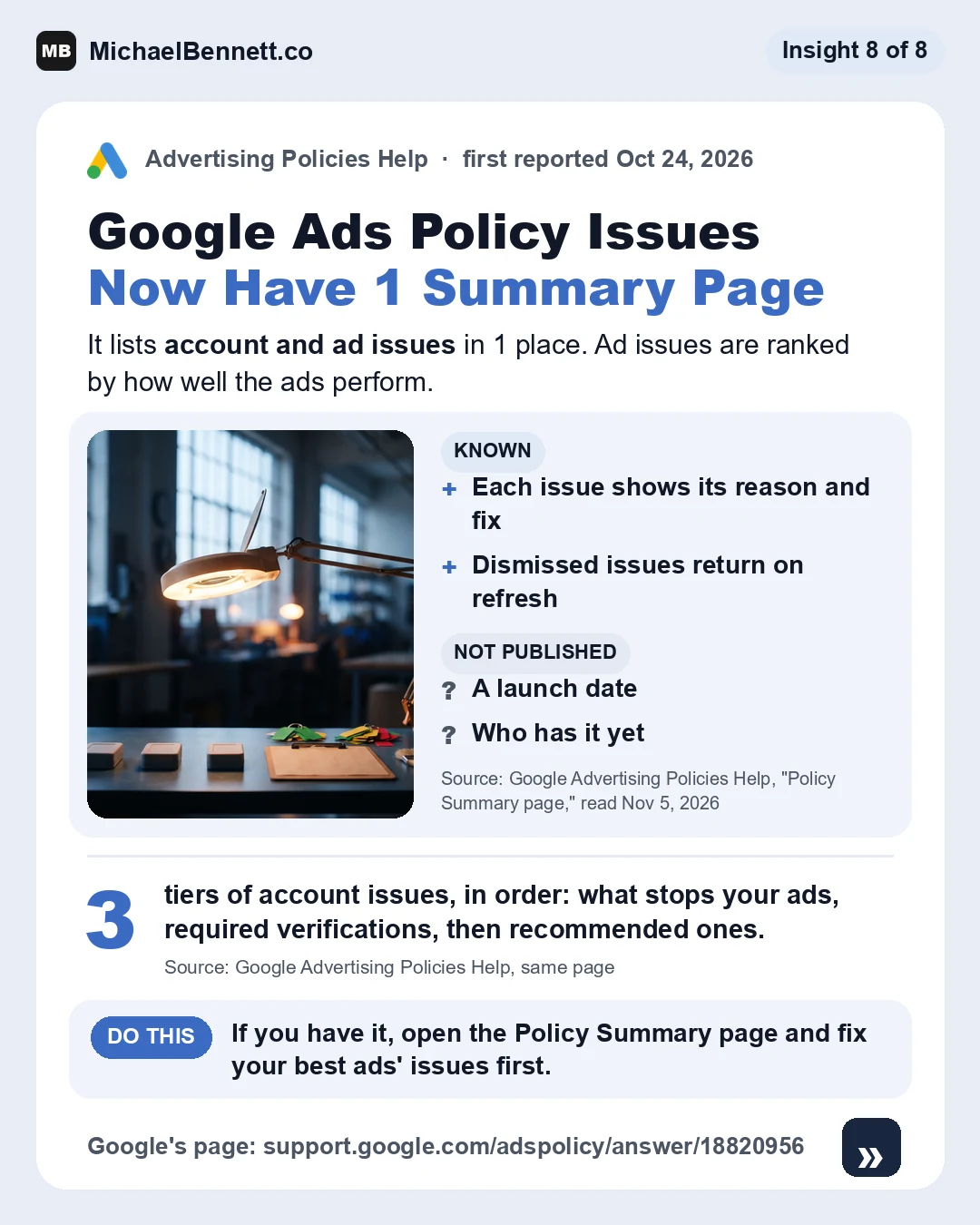
What changed. Google's Advertising Policies Help describes a Policy Summary page: “The Summary page in Google Ads provides a clear overview of your account’s policy status by showing policy restrictions, issues, and alerts affecting your account and ad creatives.” It has 2 cards. Account issues come in 3 tiers, in this order: issues that block your account or campaigns, required verifications, then recommended verifications. Ad issues are ranked by results: “Policy issues related to your ads and ad creatives are listed based on performance, ensuring that issues related to higher-performing assets are addressed first.” You choose the metric they're sorted by.
“Each listed issue provides details about the specific reason for the restriction, its impact on your ad serving, and the recommended steps to resolve it.” You can dismiss an issue, but “Any dismissed issues will show again the next time you visit the Policy Summary page or refresh the page.”
Who has it. Google's page gives no launch date and doesn't say who has the page yet. Trade press first reported it on October 24, 2026. Search Engine Land reports it under Admin, then Policy, then Summary, and reports that the old Policy Manager is still under Tools, then Troubleshooting.
Your move. If you have the page, open it and fix the issues on your best ads first.
3 October changes that didn't make the list
- Ads in AI Mode in 10 more markets. Google's blog, October 28, 2026: Google is expanding ads in AI Mode to Australia, Canada, India, Kenya, Malaysia, New Zealand, Nigeria, Pakistan, the Philippines and Singapore, with Brazil, Mexico and the UK planned for Q4 2026. It matters if you advertise in those markets.
- Reported: Meta Pixel measuring conversions on customers' devices from November 12. PPC Land reported it and quotes Meta's Events Manager. We found no Meta page that documents it, so it isn't in the 8.
- A shared opt-out from AI training. Google, Microsoft and OpenAI said on October 30, 2026 that they will honor 1 shared signal in robots.txt for AI training. Google says it plans to support it in 2027, so nothing changes yet.
Your 8 moves
Start with 3 and 2: OpenAI's rewrites have been on since October 30, and the image default for new Performance Max campaigns arrives on December 4.
- Meta: run weekly budget ÷ (cost per result × 50). Running more ad sets than that? Combine some.
- Google: in each Performance Max campaign, new and existing, keep or uncheck Sourced videos. Before December 4, tell whoever builds your campaigns whether you want image extraction.
- OpenAI: in OpenAI's Ads Manager, open Manage settings and keep creative enhancements on, or opt out.
- Google: use Smart Bidding Exploration only on campaigns that aren't limited by budget.
- Google: read your latest reviews across the web.
- Meta: try video from your still images in Advantage+ creative, and watch each video before it runs.
- Meta: check which Advantage+ creative edits are on in your ads.
- Google: if you have the Policy Summary page, fix your best ads' issues first.
Sources
- Meta for Business, “Peak Season 2026: You Don't Beat The Auction. You brief it.”, October 21, 2026
- Google Ads Help, “About sourced videos in Performance Max campaigns”, undated, read November 5, 2026
- Google Ads Developer Blog, image extraction in Performance Max, October 21, 2026
- OpenAI Help Center, “Creative enhancements for ChatGPT Ads”, read November 5, 2026
- OpenAI, “ChatGPT Ads expands to 26 new countries as over 100,000 advertisers have used the platform”, October 21, 2026
- Search Engine Roundtable, OpenAI's email to advertisers, October 20, 2026
- Google Ads Help, “How Smart Bidding Exploration for Search, Performance Max, and Shopping campaigns works”, undated, read November 5, 2026
- PPC Land, Smart Bidding Exploration in Shopping and Performance Max, October 25, 2026
- Google Ads Help, “About Review summaries”, undated, read November 5, 2026
- Meta for Business, “Advertising Week New York 2026: New AI Capabilities to Guide Campaigns and Reach Customers”, October 6, 2026
- Meta Business Help Center, notice that the terms updates are paused, read November 5, 2026
- Meta, Ad Creative Generative AI Terms, effective May 6, 2024
- PPC Land, the reported AI terms, October 22, 2026, and the delay to November 20, October 23, 2026
- Google Advertising Policies Help, “Get started with the Policy Summary page”, undated, read November 5, 2026
- PPC News Feed, first reports of the Policy Summary page and review summaries, October 24, 2026
- Search Engine Land, the Policy Summary page, October 26, 2026
- Google, “Ads in AI Mode expand to new markets.”, October 28, 2026
- PPC Land, the Meta Pixel setting, October 2026
- Google Search Central Blog, a shared AI training control for websites, October 30, 2026
- OpenAI, “Making it easier for websites to express AI training preferences”, October 30, 2026
Quotations are exact. Lines marked Our read are MichaelBennett.co's reasoning, not the platforms'.
Working out where AI actually fits in your marketing?
I write these while building the systems behind them: measurement, creative pipelines, and agents that do real work. Connect on LinkedIn and tell me what you are working on. That is where these conversations start.
Connect on LinkedIn